
I will preface this by saying plainly; I have both peers, friends and mentors who do not have a workstation. I have a friend who edits haute couture on a 16” MacBook Pro, a mentor who edited his book on similar, I have a friend who edited most of his interesting images on a phone whilst backpacking. One of my peers in the Thailand scene shoots JPEG for sporting outlets, speed trumps everything for him. In fact the majority of my career I have used current-gen MacBook Pro’s myself, and even tried the iPad Pro for size. There is a time where it becomes a bottleneck. I am not a heavy video editor — amateur in comparison to my stills work — but I know that debates on codecs and v90 cards really don’t matter (except for S&Q, which will age like milk) when you have a workstation that can brute force anything into compliance. I know the struggle of searching through tens-of-thousands of RAW images from a life’s work to find that one I wanted for a specific article and how painful that is when you are limited by BUS speeds of a consumer-oriented product. I have faced blackouts halting multi-hour transfers and corrupting drives, in Romania lost months of work due to X-Ray degradation of roll film. I know the cost of backing up. it is the reason why I have partnered with Angelbird Technologies. The same reason why motorcyclists spend thousands on an Shoei helmet. And this is me doing it from Isaan, Thailand on a shoestring. I am not an enterprise, I am not a corporation, I am one man holding myself to a standard most have forgotten — a standard that is hard to achieve in a hotel room or Starbucks on a 14” screen.
In early 2023 I had saved enough to upgrade my X-Pro3 and get back into Sony. The correctness of this decision aside, I chose to buy a workstation. When I finally moved over to the 61 megapixel A7RV back in September of 2025, I realised that my Fujifilm workflow was not going to be sufficient. Often people look at camera purchases and believe that the 160,000 Baht retail for the camera is the cost outlay. This is not the case. When you move to 61 megapixels everything becomes stressed, everything is now the bottleneck. If you want the improvements to match, your whole system and workflow must accommodate. Before I even bought the camera (and was contemplating the 50 megapixel A1II) I spent around 15,000 Baht on a 24TB HDD as cold storage (and likely to put an order in for a second), another 9,000-ish on SSD’s, and an second set of 32GB in RAM for around 4,000. That’s 1,000 US Dollars of complementary upgrades just to make sure that I could work freely with those larger files.
The market feeds off of ignorance. I could have bought a Mac Studio (or god forbid a Pro), commissioned a Asus ProArt build, and spent three times the price for less performance. In fact I am pretty sure everything listed below costs about the same as one Mac Studio specc’ed similar to my main system, and without the thermal efficiency of a mid-tower with six fans and a radiator. Every dollar that the market gains from me is a dollar I can no longer spend making the actual work. And another dollar that incentivises compliance in an inhospitable economy for creatives. This article isn’t so much about teaching how to build a PC, but how to choose. Time is valuable, and that is the point of many of my upgrades. But when you are building a workstation intended for thirty-six or more months, a week digging through specs is forgivable.
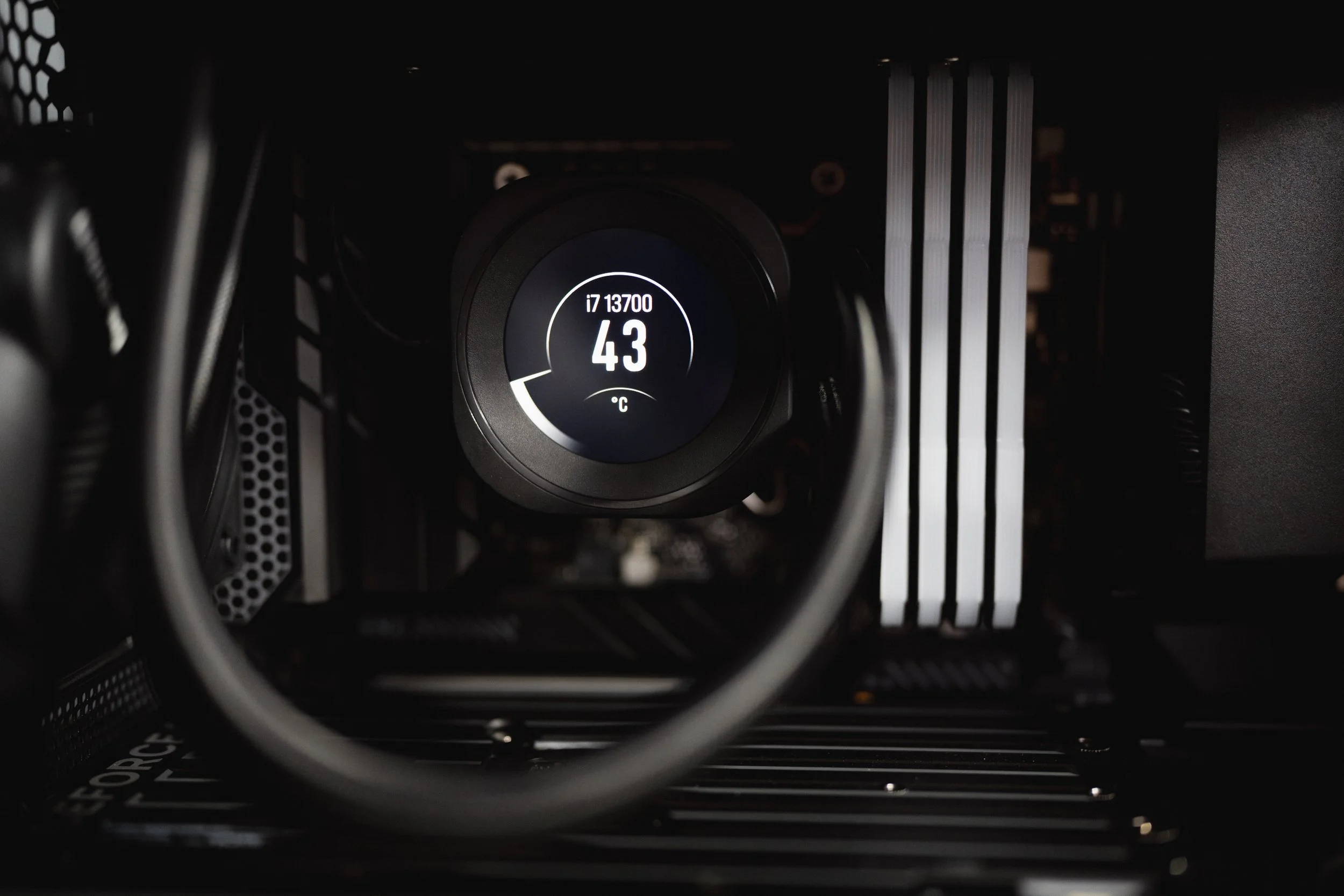
Corsair Nautilus HUD
It is worth noting that a workstation upgrade was always planned for Q1/Q2 2026, to coincide with planned post-production on Discover Temples of Thailand. A convergence of availability, end-of-year pricing, and speculation on the market regarding future pricing and availability made a 2025 year-end upgrade the logical choice.
Specifications and Reasoning
2023-2025 System:
Motherboard: Asus TUF Z790-P WIFI DDR4
CPU: Intel i7 13700
CPU Cooler: Cooler Master 240mm AIO
GPU: Asus TUF 3060 12GB
RAM: Corsair Vengance 32GB 3200 (2x16GB)
SSD: 1TB WD Black SN720 x2
PSU: Thermaltake Tough Power 850W Gold (Modular)
Cooling: Thermaltake 120mm x3 (intake) & 120mm (exhaust)
Chassis: Thermaltake V250
Build Notes:
The system was built in early 2023 and chosen with availability in-mind as usage was needed as-soon-as-possible. The i7 was chosen over the K due to stability of a non-overclocked chip, the motherboard in-particular was chosen due to 4x NVMe compatibility and NVMe heatsinks. 3200mhz, 16GB per-stick RAM was chosen so as to facilitate future upgrades despite 8GB sticks being cheaper at the time. The 3060 TUF was chosen due to the 12GB VRAM, with plans to upgrade to a 70 series card later, hence the 850W PSU. However, due to GPU economics over 2023/2024 the upgrade was never achieved due to poor price-to-performance options. SN720 SSDs were chosen due to optionality. At the time 5000 MB/s was a fast transfer rate, ideal for OS and 26 megapixel Fujifilm RAW files. Initial SSD was for OS, with files on the second. Case, PSU, AIO and DDR4 platform was chosen due to availability (in early 2023) when initially built. In hindsight DDR5 would have been a better choice, but availability in post-pandemic Thailand dictated terms. Gaming components were chosen due to superior performance.
2026 System 1:
Motherboard: Asus TUF Z790-Plus WIFI DDR4
CPU: Intel i7 13700 (-0.07 offset)
CPU Cooler: Corsair Nautilus 240
GPU: Asus TUF 5070 12GB
RAM: Corsair Vengance 64GB 3200 (4x16GB)
SSD: 1TB WD Black SN720 x2 2TB WD Black SN850 x2
PSU: Be Quiet! 1000W Gold (Modular)
Cooling: Be Quiet! Pure Wings 120mm x3 (intake) & 140mm x1 (exhaust)
Chassis: BeQuiet! Pure Base 501
Project Management Notes:
The cost of a 5070 TUF is 24,900 Baht. The cost of a 5090 TUF is 138,500 Baht. TUF is chosen due to the improved heatsinks and overall build improvements over the Prime, without the “gamer tax” of the ROG. The discrepancy in cost is over seven months of the average wage in Isaan, and personal living costs of over five months. The 5070ti TUF is 36,500 Baht, a reasonable price increase but only 20% more compute and 33% more VRAM (16GB GDDR7 over 12GB in the 5070). The next upgrade would be to 5080 TUF at 51,900 Baht for a larger bus width and the same 33% ram increase. As VRAM usage fluctuates between 8-10GB, this is considered not financially viable for the current workload.
Be Quiet! 1000W 13M was chosen due to native PCI-E support for 5.0 x16 used by the Blackwell architecture GPU and with efficiency at 94% at 50% load. The system draws approximately 500W on turbo. The price disparity between the 850W (3,500 Baht) and 1000W (4,900 Baht) makes the upgrade an obvious choice to keep the efficiency of the PSU between 40-60%. Be Quiet! is chosen due to superlative German-engineering and over-built specifications (such as included braided and sleeved cables). On a personal note the use of Be Quiet! products (such as the case) allows my system to be as visually cohesive as an Apple product, not technically a benefit until you realise looking professional means more externally than internally. Of course it also benefits in other ways too, with the main reason for purchase being the large front grille for air intake.
The Corsair Nautilus was chosen as a replacement for the Cooler Master AIO cooler — along with an undervolt — as my CPU was seeing extreme temperature spikes, and the ability of the Nautilus screen to display CPU temp allows monitoring without dedicated software open and taking up screen real estate.
2x 2TB WD Black SN850 were chosen to accommodate the increased file sizes of the Sony A7RV, and the increased (7000+ MB/s) a by-product of natural progression from 2023s SN720. The NVMe drives are housed under the motherboards built-in heatsink and are mirrored. one is the working drive for current imagery, the second a mirrored clone for immediate project redundancy within the workstation. This purchase was done in preparation for the Sony purchase (prior to the AI-Bubble) and costed 4,200 Baht per-drive. Aside: a camera-body is the initial outlay, not total purchase. These were included in addition to the SN720 drives that house OS and applications. The decision to keep the OS on the older 5000+ MB/s drive is due to transfer rates being optimised for the 61 Megapixel Sony RAW files.
I would have considered the 5080 if paired with an i9 chipset, but then power draw and thermal management become unnecessary stability issues. The i7 is purposefully undervolted to mitigate any temperature increases above 80c. As we have already discussed the opportunity cost (monthly living expenses) is far greater benefit than marginal improvements.
2026 System 2:
Motherboard: Asus TUF B760M-Plus WIFI DDR5
CPU: Intel i5 12400
CPU Cooler: Be Quiet! Pure Rock Pro 3
GPU: Asus TUF 3060 12GB
RAM: Corsair 32GB 6000 DDR5
SSD: 2TB Kingston NV2
PSU: Thermaltake Tough Power 850W Gold (Modular)
Cooling: Thermaltake 120mm x3 (intake) & 120mm (exhaust)
Chassis: Thermaltake V250
Build Notes:
With many components from the initial build now spare, the choice was to either sell and replenish costs or build a new system. The Kingston SSD was my personal donation, an old unused drive. As was the Be Quiet Pure Rock 3, initially purchased for the initial system, but unable to fit due to RAM protrusion. The only items needed were motherboard, RAM and CPU. The DDR5 platform was chosen despite the economic realities of late 2025 NAND shortages. The motherboard pricing was negligible, but RAM prices are prohibitive. The TUF board was chosen due to feature set, with USB-C integrated into the rear IO and dual heatsinks for m.2 drives should the system storage be upgraded at a later date. The i5 12400 was chosen over a 14th Gen chip due to price at only 5,400 Baht (over 8,600 Baht for a 14th Gen), without the need for thermal management due to being a non-K chip, and small power draw at only 120W max. Corsair RAM was chosen due to availability and cost at 8,900 Baht (double the pre-bubble price but I feel it will only rise in 2026). For 18,500 Baht (plus Windows key) I have recycled old materials into a capable, well-balanced, secondary system for Dararat’s Fujifilm X-T5 workflow. If the equivalent was purchased new the price of the system would be around 50-60,000 Baht. The overall thinking that went into this build was that a balanced system could be made from the remaining items for a relatively low cost. I viewed a secondary system — that in the event of catastrophic failure offers full redundancy capacity for DRobertsPhoto — as better value than resale of parts two-generations removed would bring on the Thai secondary market.
Currently this system is sufficient using FX30 proxies but for pure usability an upgrade to i7 14700 is under consideration. The system has been tested with All-Intra, H.265 and H.264. For the cost of an i7, H2.65 is the preferred workflow. All-Intra provides ease of editing at a massive media-size increase, and H.264, an unnecessary limitation. The idea of the system works in theory but as with many things in life, the quality of life improvements that come with more expensive hardware is arguably a better “value” when factoring in operation wait times. But these experiments are the point of Gear Talk, I’m not talking from above any of you, I’m out here spending my own money and figuring out where it is best used. As this system is already on DDR5 it also begins to make a lot of sense to get a GPU that shares parity in performance, and with PCIE 5.0 standards, a PSU. What was a recycled build is likely going to become my main rig in the coming weeks with little, if any, reused parts.
Field System:
System: MacBook Pro 14’ M1, 16GB RAM, 512GB SSD
SSD: Angelbird SSD2GO PKT 2TB
Project Management Notes:
Currently under construction, likely to be fortified prior to Japan expansion with secondary or tertiary backup drives by reutilising 2x 5TB WD Passport HDDs if support from Angelbird Technologies does not continue. Optimal system would include a second Angelbird SSD2GO PKT 2TB, with both drives mirrored onto WD Passport Ultra Hard Drives. It is not an editing system, this is a backup and review system. A dry-run within domestic travels will be conducted before final decision is made.
Of course, ultimately all choices were made to facilitate the two projects currently under production at DRobertsPhoto, Discover Temples of Thailand and the expansion to Japan with The Nakasendo Way, a taster for the upcoming Discover Castles of Japan. The aim is clear, with Discover Castles being a priority flagship, it is expected that funding would allow for enterprise-level production, but for it to garner enterprise-level funding I must demonstrate that DRobertsPhoto can indeed output at that level. It’s catch twenty-two, and why industries are dominated by corporate entities. I have a friend, a fantastic world-class cinematographer with some tasty credits on IMDb. He made lots of very good short films in film school where actors were a classroom over, and a closet full of Arri cameras and anamorphic lenses to hand. In the real-world he works as an ESL teacher, just so he can stay in Thailand — and for less than I spend a month making my monograph. He has the visa, but he doesn't have the time, the money, and increasingly less motivation. We aren’t so close now because I’m not afraid of reminding him that he chooses comfort, after all he’s in Bangkok and loves his weekends. I have invited him many times to come shoot with me up here and make something to pitch, because I love my Mondays. This isn’t me calling him out, it’s me showing you the trap one can easily fall into. In 2026 if you look at photography as a creative practice and not a financial and logistical project to manage, you are set for failure. Or worse… social media mediocrity.
I could have bought that CB650R that I have been eyeing, or the Rolex Explorer, perhaps a holiday or just take it easy as the cost of upgrading is a fortune here. But for me to fund Japan, The Nakasendo, everything must be put in the spotlight. The question isn’t “Can I?” But “Is a 5090 and i9 worth more than the next project?” Is an FX6 worth it if I don’t have the Kiso Valley to film? What good is a pair of A1IIs other than for Instagram braggadocio, when they are limited to the same subject as my A7RV? The industry wants consumers, not creators. This setup isn’t a “buy this to get that” list, I am documenting what is sufficient (with headroom) for my 2026-2028 workflow because whether you like it or not, gear matters — but you decide how much and not quarterly targets of the C-suite, who do buy those sorts of things with their bonuses.
I wrote this article as I write every one. Its my mile marker, my cairn. If you are walking this path too then it’s here to show you you aren’t the first, the last, and you aren’t alone. I’m here to set precedent when everyone wants you to purchase from the affiliate link. I enjoy design and engineering as much as photography, hopefully something that showed in my gear articles over at FUJILOVE Magazine. I wear a Doxa initially released in 1968 and I use a Lamy 2000 that debuted in 1966, I play a 1961 model SG. Good design dosen’t age, unfortunately tech does — but not half as fast as they make it out to. Upgrades are only needed when what you are doing isn’t working for you, and my job is to push people to the point where their work demands more. If we aren’t buying and making monographs or coffee table books, who will pay us to do it? What future will photography have? This isn’t about computers, it’s about not shooting yourself in the foot. 3D artists, designers, they don’t need to be taught this. Photography as an entire industry has become so insular and self-propagating that it is exhibiting traits of in-breeding, with the sole focus on consuming. Are you a pro? You are still just selling a service, and you are being sold services and products just so that you can sell that service. It isn’t that a wedding or event photographers job is unimportant; but that it is interchangeable. You are there to satisfy an industry. That industry bends to our will if we collectively ignore it. And the industry also gets a little scared when we correct them on the pecking order, so I make sure to do that often…
If you want to see more on my mindset I have written a What’s in my Desk? on Substack, that is less inventory and more memoir, here’s a quote from it:
“There is a lie that you can do lots with very little, and in ethos it is true. But by having done lots with comparatively little, that one word ‘comparatively’ changes everything. Let’s take this further. When you love something – truly love, not lust after status or whatever nonsense you may be led to believe – you will commit to what you need.”
If you want to see what I actually make with all this, then you are already in the right place. DRobertsPhoto is my last bastion against mediocrity. In fact, for once I will say; if you have half an hour spare and a hot cup of joe to hand, read my article, find out why I need a workstation and why I am so backup conscious. It’s free, and its honest. Two things you likely won’t see again today.